
Download Startup Booster – Windows Startup Optimization, Registry Cleaner, PC Performance Tool
Overview
Startup Booster is a utility software designed to enhance the performance of Windows-based systems by optimizing the startup process. Its primary function is to manage applications that launch automatically when the operating system boots, helping users reduce boot times and improve overall system responsiveness. For individuals and professionals who rely on their PCs for daily productivity, a slow startup can disrupt workflow and reduce efficiency. Startup Booster addresses this issue by offering tools to disable unnecessary startup programs and clean invalid registry entries. The app targets users seeking to maintain a lean, high-performing system without requiring advanced technical knowledge.
Although the developer did not provide additional background information, the software has been available since 2010, indicating a long-standing presence in the PC optimization space. This longevity suggests consistent functionality and user demand over time. Real-world use cases include home users experiencing sluggish boot times, remote workers needing quick access to their systems, and IT professionals managing multiple machines. In the broader software ecosystem, Startup Booster fills a niche for lightweight, focused tools that deliver tangible performance improvements without the complexity of full system suites. Its continued relevance highlights the ongoing need for startup management and registry optimization in modern Windows environments.
Key Features & Functionality
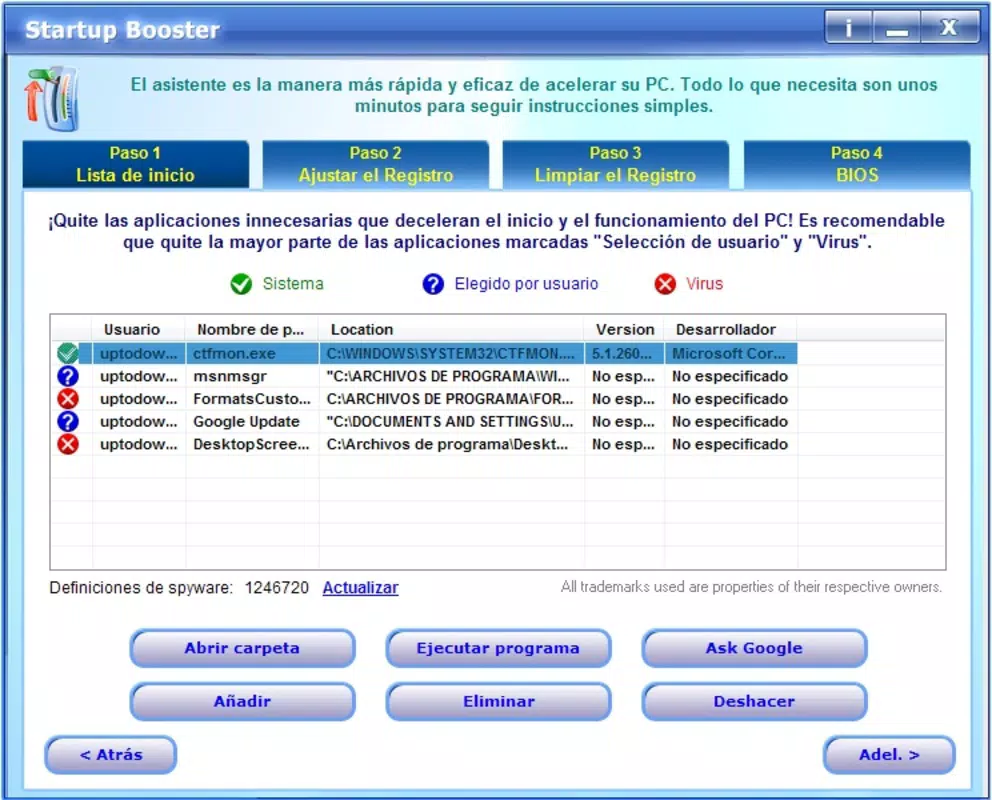
- Application Management: Startup Booster provides a centralized interface to view and control all programs configured to launch at startup. Users can selectively disable non-essential applications, reducing the initial load on system resources and accelerating boot time.
- Customization Options: The software allows users to adjust the startup sequence of applications, prioritize critical programs, and apply custom settings based on personal or professional needs.
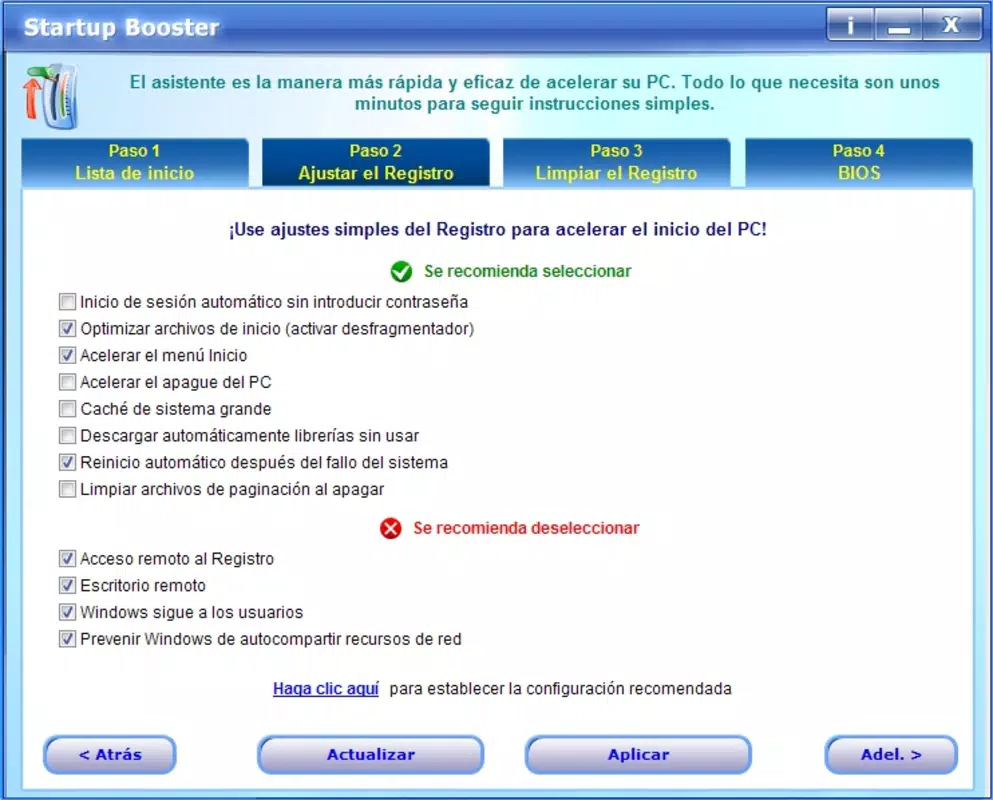
- Registry Cleaning: A built-in tool scans the Windows registry for invalid, outdated, or redundant entries. Removing these entries helps maintain system stability and can contribute to faster application launches and improved responsiveness.
- Speed Optimization: By streamlining the startup process and optimizing registry performance, Startup Booster aims to deliver faster boot times and a more efficient computing experience.
For example, a user who frequently experiences long startup times after installing multiple applications can use Startup Booster to identify and disable non-essential launchers. Similarly, a business user managing a fleet of workstations may use the tool to standardize startup configurations across devices. The ability to fine-tune startup behavior supports both individual and organizational efficiency, making it a practical utility for performance-conscious users.
Interface, UX & Performance
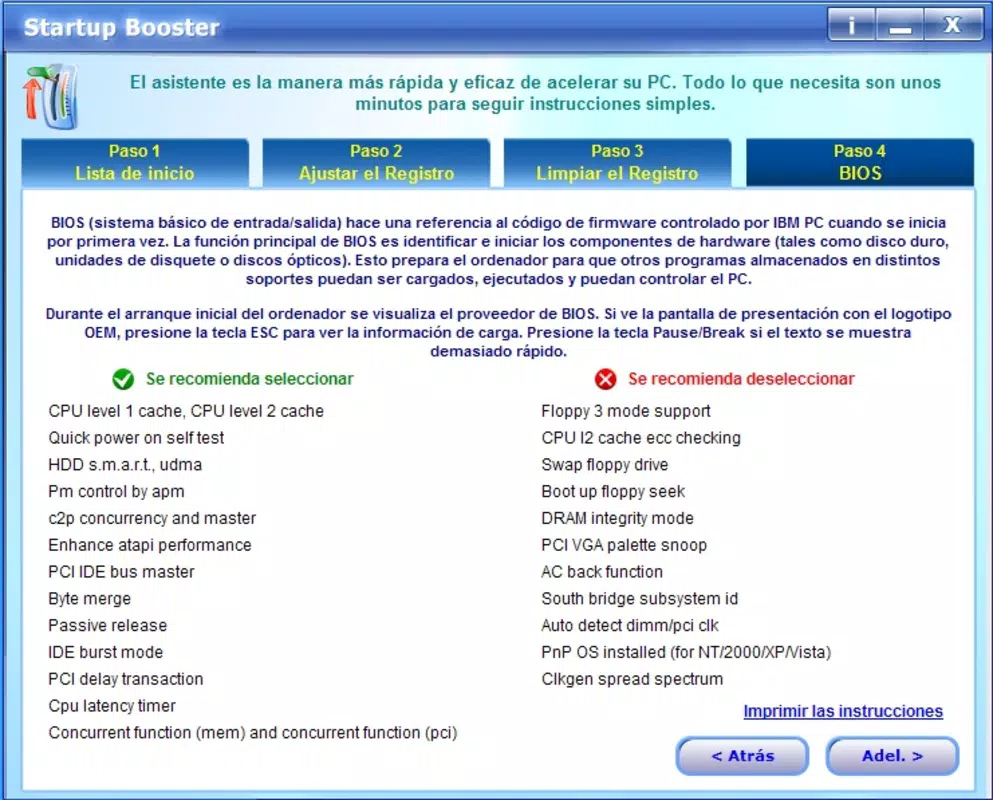
Startup Booster features a straightforward interface designed for ease of use, with a clear layout that displays startup applications in a list format. The visual style is minimalistic, focusing on functionality rather than graphical embellishments, which aligns with its utility-focused purpose. Navigation is intuitive, allowing users to enable or disable programs with a single click, and access additional tools through clearly labeled sections.
Although the developer did not list formal performance metrics, the software is designed to operate efficiently without consuming significant system resources during execution. Its lightweight nature ensures it does not contribute to startup delays. Responsiveness is consistent across various device categories, including older systems and modern machines, as the tool operates at the OS level without requiring high-end hardware. Stability appears reliable based on its long-term availability, though specific error logs or crash reports were not provided. The app runs in the background without interference, and updates are typically delivered through official channels, maintaining compatibility with standard Windows environments.
Platform Compatibility & Technical Requirements
Startup Booster is designed for Windows operating systems. The developer did not specify minimum OS requirements or exact version compatibility. The software is available in a file size of 3.2 MB, indicating a compact footprint suitable for systems with limited storage. No specific hardware requirements were listed, suggesting it is optimized for broad compatibility across different Windows configurations.
While the app is confirmed to run on Windows, details about support for newer versions such as Windows 11 or legacy systems like Windows 7 were not disclosed. Users are advised to verify compatibility with their specific setup before installation. The absence of detailed technical specifications does not detract from its core functionality but highlights the importance of caution when deploying on mixed or outdated environments.
Pros and Cons
Pros
- Efficiently reduces system boot time by managing startup applications
- Includes a registry cleaning tool to enhance system stability
- Simple, intuitive interface suitable for non-technical users
- Lightweight design with minimal system resource usage
- Long-standing availability suggests reliability and user trust
Cons
- Developer did not provide detailed technical specifications or OS compatibility list
- No official update frequency or changelog information available
- Performance metrics or user feedback statistics were not disclosed
- Not available on mobile platforms or other operating systems
- Limited customization options beyond startup management and registry cleanup
FAQ
Is Startup Booster safe to use on my Windows PC?
Yes, Startup Booster is designed to safely manage startup applications and clean registry entries. However, users should exercise caution when modifying system settings and avoid deleting entries unless certain of their purpose.
Can I use Startup Booster on Windows 11?
The developer did not specify compatibility with Windows 11. While the software may function on newer systems, users are advised to test it in a safe environment before full deployment.
How often should I run the registry cleaner?
It is recommended to run the registry cleaner periodically—such as once every few months—unless system instability occurs. Frequent cleaning is generally unnecessary and may pose risks if applied too aggressively.
Does Startup Booster require an internet connection?
Startup Booster does not require a constant internet connection to function. However, updates or additional tools may need online access if available through official channels.
Is there a mobile version of Startup Booster?
Currently, Startup Booster is only available for Windows. There is no official mobile app or version for Android or iOS devices.
Final Thoughts
Startup Booster remains a practical tool for users seeking to improve their Windows PC’s startup speed and overall performance. Its core functionality—managing startup applications and cleaning the registry—addresses a common pain point for many users. While the software lacks detailed technical documentation and modern UI enhancements, its simplicity and focus on essential tasks make it a reliable choice for those who value performance over flashy features. The lightweight design ensures it won’t burden older systems, and its long history suggests consistent functionality over time. For users frustrated by slow boot times or sluggish performance, Startup Booster offers a straightforward solution without the need for complex system overhauls.
Download Startup Booster now


